Friday, December 2, 2011

Podcast Interview With Aaron

For today's post I thought it would good to have an interview, with actual audio of the interviewee.

I apologize in advance for any audio issues, my equipment wasn't high quality. If having trouble with podcost on blogger I provided a link to the audio in the cited works section.


Cited Works


zSHARE. (2011). 1202112333a.qcp. Retrieved December 2, 2011 from http://www.zshare.net/download/96899572198f1815/

Guest Blogger (Jennifer): Tutorial Critique 5: Optimus Prime Line Art

Hello readers of Drawing Better Everyday, my name is Jennifer. And I'll be doing a guest blog for today. This tutorial will be over how to draw Optimus Prime from the new Transformers movies.

I found this tutorial while skimming around websites for anything that would catch my interest.

Pros

  • The tutorial is about Optimus Prime.
  • The tutorial ha images that go along with the steps.
  • The steps in this tutorial are pretty basic.
  • This could be used for any art medium, whether it be digital or traditional.
  • The final product has a really nice look to it.

Cons

  • The tutorial is almost too simple
  • It doesn't provide a level of skill an artist is required to do this.
  • The artist is very, very vague on the steps. One step was details, and then next step was just “more details”.
  • This doesn't explain much on how to draw a Transformer, for this tutorial could apply to anything, just change around the topic. So, it's not very unique.

For this tutorial, a more advanced level of skill is required. Transformers have a lot, I emphasize this, of detail. The artist doesn't really provide helpful tips on how to execute these details, so the artist taking after the tutorial has to just wing it with their imagination or use a reference. It would have been nice if the artist had provided more in depth steps that made the tutorial unique to Optimus Prime. For example, how to add in the exterior of the car to his body, or the inner wiring.

Here below is the process to get to the final product.


Works Cited

Dawn. (2008). How to Draw Optimus Prime From Transformers. Retrieved November 25, 2011 from http://www.dragoart.com/tuts/559/1/1/how-to-draw-optimus-prime-from-transformers.htm

tuturius. (n.d.). Free 3d Model Optimus Prime - Free Tutorial and Design Idea on Tutorius.net. Retrieved November 25, 2011 from http://www.tutorius.net/2010/05/free-3ds-max-model-optimus-prime/free-3d-model-optimus-prime/

Interview 2: Danny

Me: First off I want to ask, do you draw?

Sometimes. Not as much as I used to. Now, I just doodle in my notebooks during class.

Me: How adept would you say you are at drawing?

I mostly draw anime, nothing super fancy, like, real looking people.

Me: Do you plan on doing anything with this skill?

Not really. I mostly draw just for fun.

Me: Do you think drawing tutorials have helped you develop those skills?

Yeah. I mostly look at ones for cell shading.

Me: for reader clarity, can you explain what cell shading is?

That’s kinda hard. Um. You know how when people are shading in regular pictures, it’s basically like that, except you’re only using a few colors, and you’re not really blending them in. I don’t know. It’s kinda hard to explain. Guess that means I won’t be going into teaching.

Me: I’m guessing you haven’t made a tutorial of your own then.

Oh god no. I’d probably end up teaching them something completely different than what I’m supposed to.

Me: Can you think of a drawing tutorial that you did like?

Yeah. It was one about cell shading.

Me: Can you think of one that didn’t work?

Not at the moment, no.

Me: What do you think makes a good drawing (or art related) tutorial?

I think it just needs to be able to teach me something. If I’m not learning anything, then it’s not a tutorial, or at least not a good one.

Me: Thank you for your time.

Your welcome.

Interview 2: Ashley (UTD Student)

Me: First off I want to ask, do you draw?

Yes.

Me: How adept would you say you are at drawing?

Well, I wouldn’t say I’m a pro. I mean I still have a lot to learn, but I think my skills are pretty good. I mean I have been drawing since I was little, so I feel like it comes pretty natural to me. But that’s just my opinion. Other people may feel differently.

Me: Do you plan on doing anything with this skill?

Yeah. I want to be a concept artist for like movies, games, and animations…stuff like that. I would prefer to work with creating the characters since I like drawing people, but if they hire me for some type of architectural thing, I’m fine with that too. Anyway I can get in the door.

Me: Do you think drawing tutorials have helped you develop those skills?

I guess. I mean I don’t look at too many tutorials, unless you count an actually teacher instructing me. Does that count? I mean that’s what a tutorial does right?

Me: More or less. Teachers are just more credible.

Yeah. I’ve used some, but I usually end up giving half way through, because I’m trying to do the tutorial verbatim. So if it’s not looking like what it’s supposed to I just quit. I normally just go off instinct anyway.

Me: So, you don’t think tutorials are helpful?

Not necessarily. I’m sure some are good. I’m just talking about my own experience with them. I have a short attention span, so going through with a tutorial is just something I don’t normally do. But, yeah, some people probably find them helpful. It’s just not more me.

Me: Can you think of a tutorial that you did like?

Um, there was this one about lighting. I tend to have trouble working out shading, because I can’t pick a concrete light source. So, that one was pretty useful.

Me: Can you think of one that didn’t work?

Yeah. It was about, like, drawing a car. I’m really bad at drawing cars, so I looked at it for help. But all it showed was this video of what the person did. He didn’t explain anything, he just drew. So I couldn’t learn anything from it. I stopped watching after the first minute.

Me: What do you think makes a good drawing (or art related) tutorial?

First off, I think the work has to look good. I know it sounds bad, but I wouldn’t look at one that had subpar artwork. It just makes the person look less credible. After that, I probably would like it to have some picture that I can look at, since it is a drawing tutorial. And it has to actually teach me something. Like the bad one I mentioned before. I wouldn’t consider that teaching me anything.

Me: Well, thank you for your time.

No problem.

How To Draw A Proportionate Body

Today I thought I would turn the tables on myself, and try at making a tutorial myself. From the tutorials that I have reviewed so far, I feel I will need to include:

  • Images
  • Short concise steps
  • Comment feedback
  • Extra detail where needed
  • Making accessible to beginners in the art world

Since I feel I have a better understanding of the human form, my tutorial will focus on how to draw human body proportions. To make it more accessible, I will leave the figures stationary, i.e. I will draw them standing, facing the front. Keep in mind this is how I draw my proportions, and is not the end all be all for how to do this.

Step 1: I usually start off with drawing the head. To do this I create an inverted egg shaped.

Step 2: Next you draw in an extended vertical line down the center of the head. Make the line about the length of seven heads from. Then you’re going to draw a horizontal line a little below the chin. This will be a reference to the shoulders. The length of the shoulder is about the length of two of the heads.


Step 3: This step deals with the torso and pelvis. In this area, men and women differ in that men have a more boxed shaped and women tend to have curves. So, keeping that in mind, a basic rectangle can be used for a generic man, and hourglass can be used for a woman.

*Note that not all body frames are the same (even among the same sex), so the shape really depends on the type of body you want to draw. For example, an inverted triangle is good for someone with a bulkier upper body, and circles and ovals are good for heftier people. Also, men’s’ torsos tend to be more elongated than females.

Step 4: after you’ve gotten the step 3 out of the way, you’ll want to draw the arms and legs. During this stage you may want to use circles to identify the joints, i.e. shoulders, elbows, wrists, and knees (basically where any part bends). For the arm—the elbow stops around the bottom of the rib cage, and the wrists stop around the pelvic area, and the hand is 2/3 the length of the head. The thigh of the leg is about equal length as the arm from the elbow to the tip of the middle finger. The calf is around the same length (if adding the length of the ankle to heel of the foot)—so just a bit shorter.


Step 5: Now we flesh out the figure. When doing this, I just imagine putting a skin suit on a stick figure. The frame you’ve created should serve as a nice guideline, just be sure to add bulk to the legs and arms (unless you want the person to be super skinny).


And there you have it, a proportionate human being.

Tutorial Critique 4: Portrait Replication

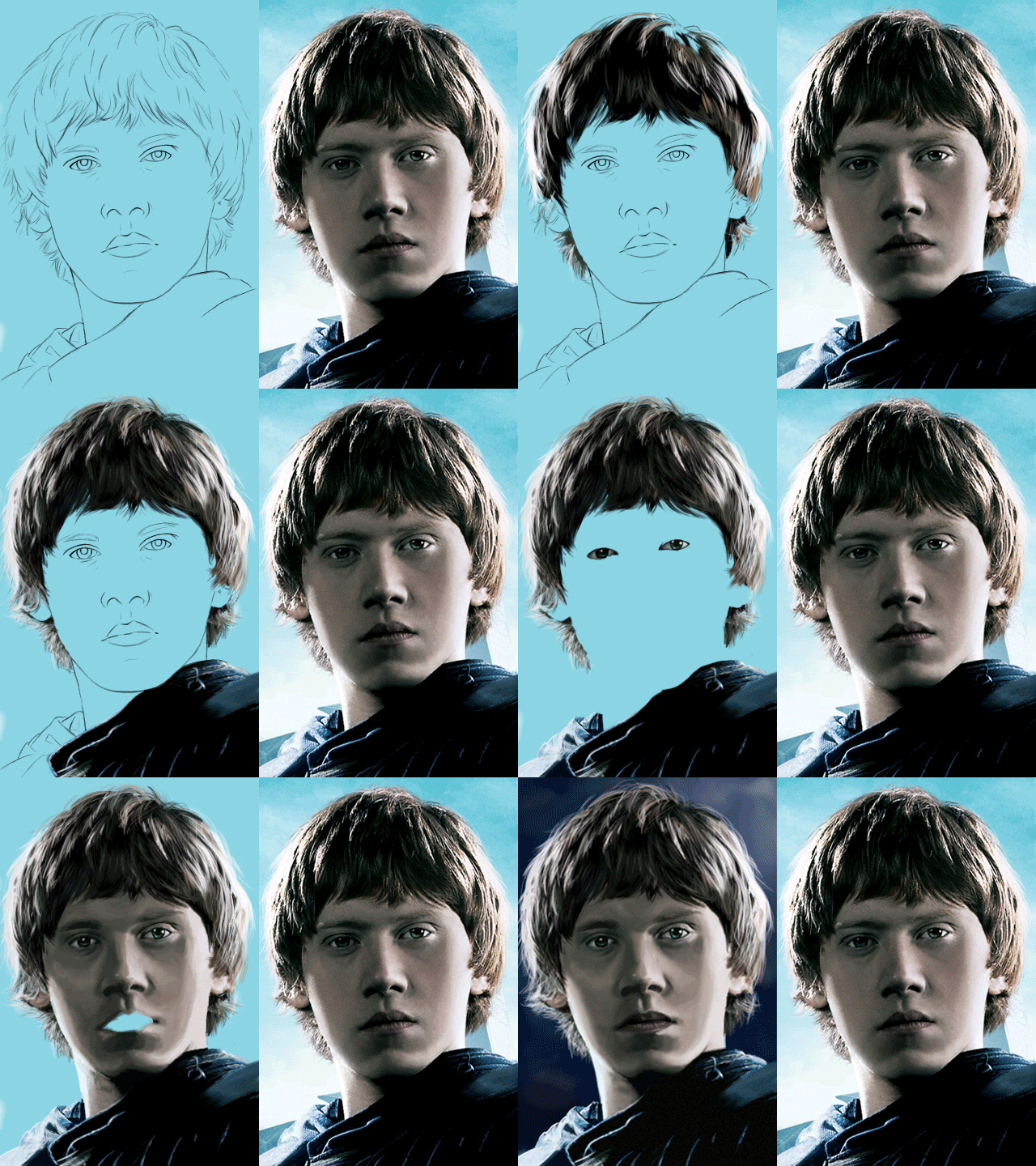
Today's tutorial critique will be over portrait replication, portrait replication (as the name implies) involves the artist looking at a photograph and transferring exactly what they see onto the canvas.

Once again, I went to my old friend deviantART for this tutorial. A little on the artist—he is a professional artist, more specifically an illustrator, and he has a BFA from Maryland Institute of Art.

Now, as usual I will give my thoughts on the tutorial.

Pros

  • The tutorial has images.
  • The tutorial steps are detailed, so much so that the artist goes over ever facial feature individually.
  • The artist encourages drawing flaws on the face (such as wrinkles). Physical flaws are a essential part of the physical appearance of the face, it’s what makes the person them. Ignoring this could change the picture drastically and make the portrait look like someone completely different.
  • The tools used are mentioned, such as the program and tablet. This can be useful for those who want to copy the technique verbatim.
  • The final product is done well, implying the artist knows what he’s talking about.

Cons

  • Comments are disabled, so giving feedback is limiting. Though the artist did give a reason (he was changing deviantART account).
  • The images and text have to be viewed separately. Not because they’re on different pages, but the image is so large that the viewer has to constantly scroll up and down to reference the image and read the steps.
  • The text is long and stacked with little space in between lines.
  • There are numerous emoticons in the text. This can be a problem since there is so much text to begin with; adding something extra can be excessive.

For this tutorial the experience level required is a bit of a tossup. While I understand the tutorial is over replicating a drawing (so no conceptual aptitude is required), I have seen people have a difficult time tracing an image, let alone drawing one free hand. Based on that, I would suggest the artist have some level of experience, since they’ll need to know how to draw a face proportionately, how to blend colors properly, and understand how lights and shadows fall on the face. Overall, I think this is a good tutorial, if a bit for more adept artists.

As usual, here are my efforts.

Ron Weasley: Drawing Progression

Cited Works


coldsnapkiller. (2011). 1-1.gif picture by coldsnapkiller. Retrieved December 2, 2011 from http://s1098.photobucket.com/albums/g371/coldsnapkiller/?action=view¤t=1-1.gif

deviantART. (2011). deviantART. Retrieved October 21, 2011 from http://www.deviantart.com/

Digital Citezen. (2009). Ron Weasley. Retrieved December 1. 2011 from http://digitalcitizen.ca/2009/09/03/harry-potter-wallpapers-for-iphone-and-blackberry-bold-9000-480-x-320-pixels/printable-card-from-wallpaper-41/

shley77. (2005). Painter Portrait Tutorial. Retrieved December 1, 2011 from http://shley77.deviantart.com/art/Painter-Portrait-Tutorial-21629016

shley77. (2011). shley77 on deviantART. Retrieved December 1, 2011 from http://shley77.deviantart.com/

Wednesday, November 30, 2011

Tutorial Critique 3: Eyes

I went to YouTube for this tutorial . I chose YouTube because wanted to see how a video based tutorial stacked up against one with still images. Interestingly enough, they’re quite similar, the main difference being that videos allow for audio (I would also say moving frames, but artists could use a gif for image progression). Again, I will give a little info on the artist. He went to New England Institute of Art, he has several sites that he uses to showcase his work (which in my opinion is excellent). For those interested, his sites are on YouTube, deviantART, and Blogger .

On to my critique of the tutorial.

Pros


  • He shows visual progression.

  • The text is short and concise.

  • He accepts criticism, and allows feedback from his viewers.

  • The final product looks good (in my opinion), suggesting he knows what he’s talking about.

Cons


  • The text doesn’t go too much into detail about how he does what he does.

  • From what I can tell, the tutorial is more for people who already have an understanding of how to draw an eye. So this isn’t really for beginners.

  • He skips how he did his line art, which some people might find helpful (though he does link to a previous tutorial he’s done that goes over how to draw the eye from scratch).

  • The audio consists solely of background music. This isn’t necessarily a con. Some viewers may find it enjoyable, others may not.

  • The title is a little deceptive. The tutorial is more focused on shading the eye, rather than drawing.

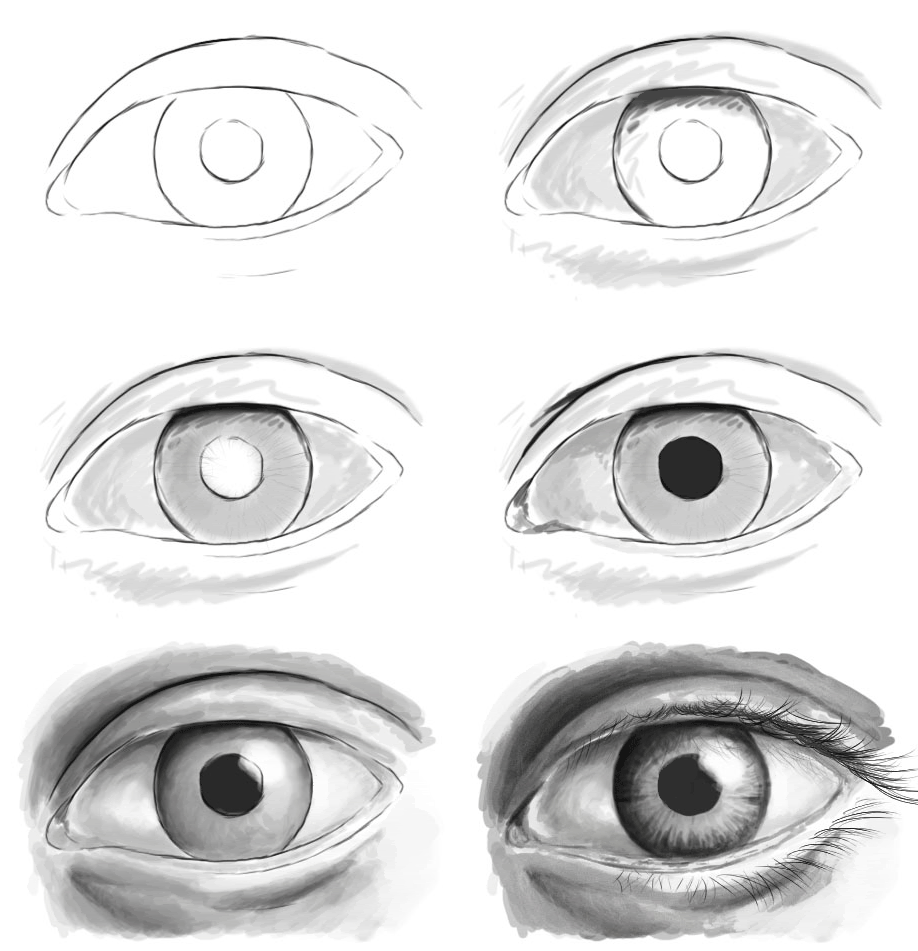
The tutorial is helpful, but like I said before, not for beginners. An artist has to understand how shadows and lights fall onto the eye (or any subject) for them to fully take anything from the tutorial. Although to his credit, I am not a beginner, and I don’t think I have ever drawn an eye as good I have before following this tutorial.

Here is my product.

Eye Progression

© All rights for the above image reserved

Cited Works


coldsnapkiller. (2011). 1.gif picture by coldsnapkiller. Retrieved November 29, 2011 from http://s1098.photobucket.com/albums/g371/coldsnapkiller/?action=view¤t=1.gif

Isaiah. (2011). Eye Drawing Tutorial. Retrieved November 29, 2011 from http://www.youtube.com/watch?v=AvKBWaOQ28M

Isaiah. (2011). IsaiahKS on deviantART. Retrieved November 29, 2011 from http://isaiahks.deviantart.com/

Isaiah. (2011). isaiah's Channel - YouTube. Retrieved November 29, 2011 from http://www.youtube.com/user/isaiahs

Isaiah. (2011). Sick Sad Story :). Retrieved November 29, 2011 from http://isaiahks.blogspot.com/